
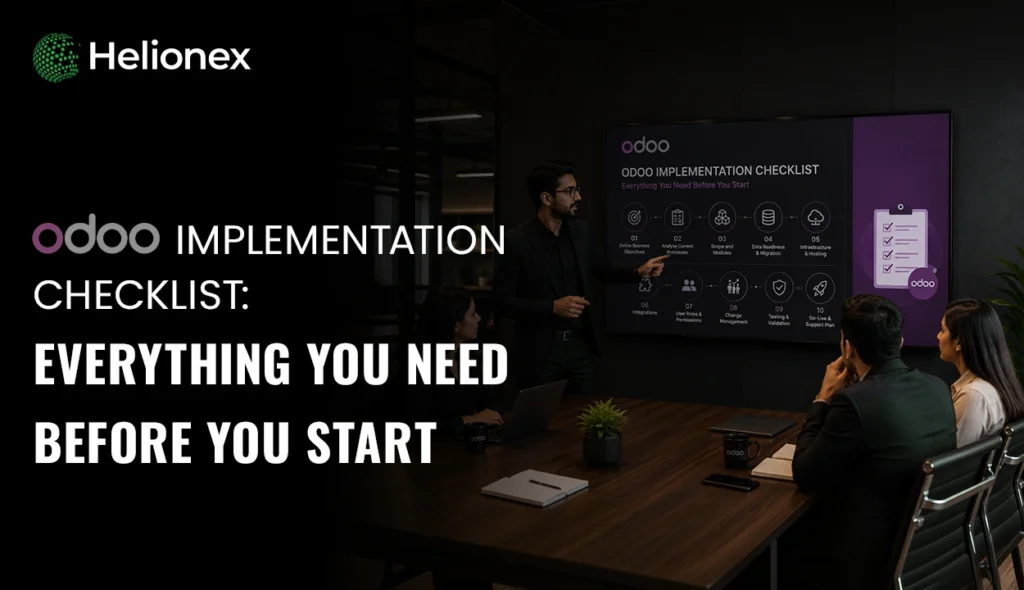
This comprehensive Odoo implementation checklist will serve as your step-by-step guide through the Odoo implementation planning, implementation, testing, and Odoo deployment process within your company. This checklist will make certain that you thoroughly cover every aspect of Odoo ERP implementation, including understanding your requirements, Odoo module deployment, data migration, customizations, integration, Odoo testing, and training, as well as Odoo post-launch support.
With the right Odoo implementation checklist, you’ll be able to mitigate potential implementation risks and implement an ERP system which completely reflects the operational realities of your business right away.
The implementation of an ERP solution means much more than just an installation of an ERP program. The transition signifies a complete overhaul of your business’s operational processes, ways of recording and reporting information, and how you make operational and strategic decisions.
This is a primary factor why companies across industries invest in ERP solutions such as Odoo-its adaptability, extensibility, and capability to consolidate department functions on one platform make it an ideal system. However, without proper strategic planning, Odoo ERP implementation will likely end in a fiasco.
The Odoo implementation checklist empowers your company by laying a groundwork map of each necessary process that must be followed up until your ERP launch day.
It will assist you to discover how the ERP could address each requirement of your business, organize and implement Odoo modules and data migration and also help your team determine the goals you wish to accomplish through implementation, standardize operation, set up a sensible schedule, and make ERP ready for the business use.
Effective implementation is contingent on many different technical, business, and operational considerations. These preparations will allow your company to have an Odoo ERP system that runs the business instead of one that just runs itself.
What Should You Include in an Odoo Implementation Checklist?
The essential Odoo Implementation Checklist must involve all the key actions that must be taken to execute an ERP implementation efficiently from preparation and planning to installation, testing, Go-Live and aftersales. The implementation checklist also guarantees better project control to ensure nothing has been missed during the implementation phase. Prior to beginning any ERP implementation, organizations need to analyze the company present processes, assess their necessities, choose which Odoo module they need, carry out the data preparation and appoint a lead for each section.
The typical Odoo implementation Checklist covers all steps as follows;
- Business requirements analysis
- Odoo implementation planning
- Correct Odoo Module Selection
- Workflow designing
- Data cleansing & Migration of existing data
- Third-party applications integration
- Customize ERP requirements
- User Security roles management
- ERP testing & QA (Quality Assurance)
- ERP user training
- Go-live planning
- Post-implementation support
A Checklist will guarantee a sound technical execution but will also help everyone to develop a collective vision of the implemented project.
Why Is Business Requirement Analysis the First Step in an Odoo Implementation Checklist?
The cornerstone of a successful Odoo implementation is business requirement analysis; it tells what the business requires from the ERP system. Without configuration of any module, businesses should determine their current issues, operational gaps and future needs.
Through this phase, the implementation team can explore all the work processes of the business like sales, finance, inventory, production, and HR etc. This is called business process mapping, which means documenting how the processes proceed through the business organization and what should be automated to have more efficient operation.
The requirement analysis should uncover:
- Current operational problems
- Manual operations to be automated
- Reporting needs
- Department-specific process
- User’s access and role rights
- Requirements of scalability and future needs
For a retailer, real-time stock visibility, automated purchase orders, integrated sales reports, etc. While the manufacturing business would need to get functions related to production schedule, quality control, and supply chain management.
The purpose of the requirement analysis is simple: configuring Odoo to the business’s process instead of re-adjusting business process to meet the wrong settings.
How Do You Select the Right Odoo Modules Before Implementation?
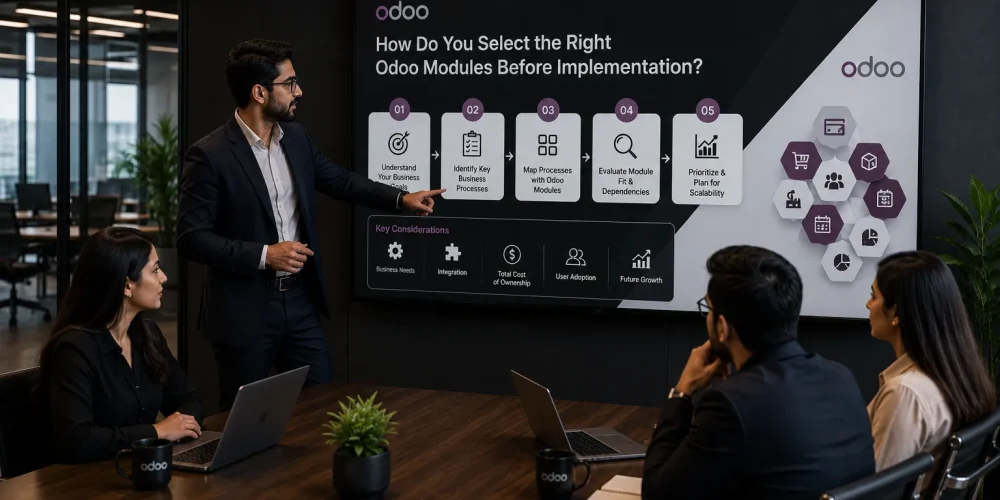
Choosing the correct Odoo modules is crucial because including unwanted modules adds unnecessary complexity whereas excluding essential modules hinders business efficiency. Therefore, Odoo module selection is a vital part of an Odoo Implementation Checklist.
Odoo has numerous modules including CRM, Sales, Accounting, Inventory, Purchase, Manufacturing, HR, project Management, Marketing Automation, and eCommerce, etc.
However, businesses must implement only those Odoo modules that fit the business needs instead of choosing every module Odoo has. By choosing carefully, it would be much easier to achieve higher user adoption and also to save considerable amount of work from unnecessary configurations.
- While deciding which Odoo modules need to be included, businesses must ask themselves following questions:
- Which departments require automation?
- Which processes take up most of the time?
- Which reports are needed to guide strategic decision making?
- Which processes need integration?
- What functions are needed currently and what can be addressed in future implementations?
To overcome this dilemma, we can adopt a modular approach to implement necessary modules and add others as per business growth.
We will make sure the Odoo implementation expands with the business rather than creating complexity from the beginning.
How Should You Prepare Data Before Migrating to Odoo?
Odoo Implementation Checklist: Why the Data Migration phase is crucial Data Migration is arguably one of the most crucial steps of any Odoo implementation project. The accuracy and effectiveness of your Odoo ERP system largely depend on the quality of data that is migrated. Any incorrect, outdated or duplicate information, when moved into your Odoo system can create problems rather than solve the existing ones.
One of the most important elements of an Odoo Implementation Checklist is data migration, as the data moved directly impacts its efficiency and daily activities. Migrating obsolete, redundant or fragmented information will not resolve issues but it will cause more, if the information transferred into Odoo are poor quality.
Data Cleaning: Prior to going live on Odoo, a business should clean its data before transfer. This ensures that data in Odoo is reported with a higher degree of accuracy, that workflows can be properly automated and that the information facilitates the most informed decisions.
A Good Data Migration on Odoo requires:
- Checking over old records/databases
- Cleaning all duplicate vendor and customer, and product master files
- Standardizing data from other data sources
- Defining data owner responsibility
- Matching of existing data to Odoo fields
Data mapping (identifying where customer data, product data, sales data and financial data will fit within Odoo) is the key which helps the business to make its new Odoo the central hub for the operations. So don’t look to just migrate data rather ensure the data is clean.
What Customizations Should You Consider During Odoo Implementation?
Odoo customization should improve your business process, don’t complicate matters. Many of the things your business wants or needs from Odoo are available out of the box, but for those unique to your workflows or industry, custom development may be necessary. On your Odoo implementation checklist, it’s important to determine what absolutely needs custom development versus.
Some of the most common places businesses customise: Custom reports & Dashboards Automations Workflow based on approvals Industry-specific Odoo Modules User Interface adjustments to the ERP More complex business rule logic Customized notifications & automated messages Other Odoo Automation features Don’t customise before asking: Can this requirement be configured? Configuration refers to altering the Odoo setting and controls; whereas, customisation refers to modifying or expanding the base software code. For instance, a business might want an automated purchasing workflow and approval. This can be achieved through standard Odoo workflows without new code.
Don’t over-customise!
Each custom modification will take time and cost money to maintain, particularly during an Odoo upgrade. The best Odoo customisations add measurable business value.
How Do Odoo Integrations Affect Implementation Planning?
Odoo Integration steps are critical because no modern business exists in a vacuum; your ERP must integrate with payment gateways, eCommerce, CRM systems, shipping providers and numerous third party applications. This connects Odoo to the other systems used by your company so data moves automatically between each of your business applications.
This eliminates redundant data entry, reduces errors, and centralizes your operational functions.
Typical Odoo integrations include:
- E-commerce Platform integrations
- Payment gateway integrations
- CRM systems
- Banking software
- Shipping integrations
- Business intelligence integrations
- Marketing automation integrations
During the integration process, you should consider:
- What other systems must connect with Odoo?
- What data should be transferred between these systems and Odoo?
- When should data be synced?
- What level of security is necessary for each integration?
Most integrations require API (Application Programming Interface) connections, through which your Odoo system sends and receives data
The goal of integration planning is to turn your Odoo ERP into the center of your business rather than simply one other isolated software application that you use.
Why Is Testing Important Before Odoo Go-Live?
Testing, Testing, and More Testing: Testing is a very important stage in an Odoo implementation process. It’s the stage that ensures your new Odoo instance functions perfectly for your employees before being used in actual day-to-day business operations.
Ignoring this step means you’ll face system glitches, inaccurate reports, and unhappy employees in post-launch, or worse.
This stage will confirm that all your configured modules, integrations, workflows, and custom development will work as per the specific requirements of your business.
Here is a complete breakdown of an Odoo testing methodology:
- Functional Testing: The purpose of this stage is to ensure that individual Odoo modules perform according to business processes.
- Integration Testing: Testing is carried out to determine if different systems are able to integrate with one another and exchange information with each other.
- User Acceptance Testing (UAT): Actual users from your organisation will carry out tests to ensure the system has met the requirements set out for their use in the real-world operations.
- Performance Testing: In this stage, tests will be performed on the speed, performance and stability of the system with expected business workloads.
Before going live, the sales module should ideally undergo tests where all the process workflows from creating a quote, sending an invoice and inventory updating all happen successfully without issues. Testing is not simply a technical process, but also a business validation that allows your team to use Odoo from the get-go with full confidence.
How Can Businesses Prepare Employees for Odoo Adoption?
Employee readiness It’s a forgotten pillar of ERP, yet employee readiness contributes heavily to ERP success. Even with the most optimized ERP software on the planet, your business cannot leverage it fully if employees don’t know how to operate it well. An efficient Odoo implementation checklist will have change management as a priority and a plan to transition your team from old workflows to digital workflows.
Employee preparation means you should consider:
- Role-based training
- Department-specific demonstrations
- User guides and manuals
- Participation in testing
- Post-launch support
One of the essential things for user readiness is RBAC (Role-based Access control).
This security feature makes sure that employees can only access the specific modules, data, or actions that are necessary for their duties. For instance, the accounting team can be provided access to the financial ERP modules whereas the team managing inventory will be given access to the inventory modules. Employee readiness is key to ERP adoption since employees would embrace the change, know how to use the software, and see the advantages it offers for their daily work.

What Are the Common Mistakes to Avoid During Odoo Implementation?
Many businesses have a failed ERP implementation by solely focusing on the software configuration process rather than their overall business readiness. In fact, realizing Odoo implementation mistakes is the best way to evade extra costs, delays and user resistance in the future.
Top Odoo implementation errors:
- No prior understanding of your business requirements and goals
- Investing in features that don’t seem essential for your operations
- Transferring inaccurate or outdated data
- Over-customization
- Overlooking team training
- Poorly executed testing process
- Underestimating the overall project timeline
- Opting for an inexperienced Odoo implementation partner
In addition, a common mistake is the treatment of Odoo as if it’s just another software installed in your enterprise, when in reality it’s an endeavour for business transformation that requires deep analysis, modification of processes, and ongoing collaboration among all involved parties.
How Long Does an Odoo Implementation Take?
The timeline for Odoo implementation depends on business size, project complexity, customization requirements, data volume, and integration needs. There is no universal timeline because every organization has different operational requirements.
A typical Odoo implementation process may include:
Implementation Stage | Estimated Duration |
Requirement Analysis | 1–3 weeks |
Planning & Configuration | 3–8 weeks |
Data Migration | 2–6 weeks |
Customization & Integration | 3–12 weeks |
Testing & Training | 2–6 weeks |
Final Deployment | 1–2 weeks |
Small businesses with standard requirements may complete implementation faster, while large organisations with complex workflows may require a longer approach.
The key factor is not completing implementation quickly but ensuring the system is properly configured, tested, and adopted by users.
How Much Does Odoo Implementation Cost?
Odoo implementation cost varies depending on factors like the number of users, modules selected, implementation approach and required customizations, integrations, modules and ongoing maintenance. Key Odoo Implementation Costs are discussed below. Number of Odoo applications to be implemented
- Business workflow complexity.
- Migrating current data in the Odoo ERP.
- Customize Odoo applications.
- Integrate with third-party applications.
- Odoo training.
- Odoo ERP business planning.
- Maintenance and support.
When planning the implementation phase of Odoo ERP, businesses should think about the long run. With effective and careful planning, the ERP solution may not solely support Odoo business functions and automate repetitive work but can even drive business growth through visibility, automation, and efficiency while sticking to budget and achieving the full return on investment of your implementation project.
Companies across industries invest in ERP solutions such as Odoo because of its flexibility and modular approach. However, organizations with more complex enterprise requirements can also explore Microsoft Dynamics 365 Finance & Operations implementation to support advanced financial management, supply chain operations, and large-scale business processes.
Why Choose Helionex as Your Odoo Implementation Partner?
A key item on your Odoo implementation checklist. The right Odoo Partner will make a huge impact on the overall success of your implementation. A great partner will do more than just set up your software, they’ll be focused on understanding your business, recommending enhancements, and architecting the right ERP for your organization. Helionex provides expertise that businesses can utilize to drive success during their Odoo Implementation by using our proven business-first approach.
Why Businesses Select Helionex: We review your existing business challenges and then apply the most appropriate Odoo modules to fulfill your business needs.
Customized Odoo Solutions: No two business processes are alike, and this is a great thing about Odoo. Helionex will customize your Odoo to perfectly match your existing business while keeping it practical.
Data Migration Services: We assist your company with the transfer of current data and integrate your business into the brand new Odoo Solution seamlessly and safely.
Integration & Automation: By integrating a myriad of third party modules with your Odoo solution and automating your present workflows, we will integrate Odoo fully into your business in the simplest way possible.
Ongoing Support & Maintenance: The project does not end at implementation, with Helionex your organization is supported every step of the way as you scale your business by continuing to develop your ERP system.
Properly implemented by expert implementation consultants, your ERP solution can become the nerve centre of a more intelligent business.
Helionex provides expertise that businesses can utilize to drive success during their Odoo implementation by using our proven business-first approach. Through our Odoo ERP implementation services, we help organizations build scalable ERP solutions that improve automation, visibility, and overall operational efficiency.
Conclusion: How Does an Odoo Implementation Checklist Ensure ERP Success?
Odoo Implementation Checklist to Reap Benefits: A sound Odoo implementation checklist guides you throughout the journey to successful ERP adoption. From data migration to user training, from data requirement analysis to selecting ERP modules, your business will be directed to a long-term success journey. An Odoo implementation is not only installing the software but installing systems for smarter decision-making of a business, its smart systems help enable business scalability.
Your Odoo implementation journey becomes smoother if partnered with an Odoo implementation partner in Ireland like Helionex who will provide you get the best ROI for your Odoo ERP system.