
Automation is not a game only for the rich and technically savvy; every type of business, from a local shop to a global corporation, can benefit from it. Companies around the world are automating business tasks, saving time, increasing precision, accelerating approvals, and smoothing internal workflows.Before buying a digital workflow solution or connecting cloud-based applications …
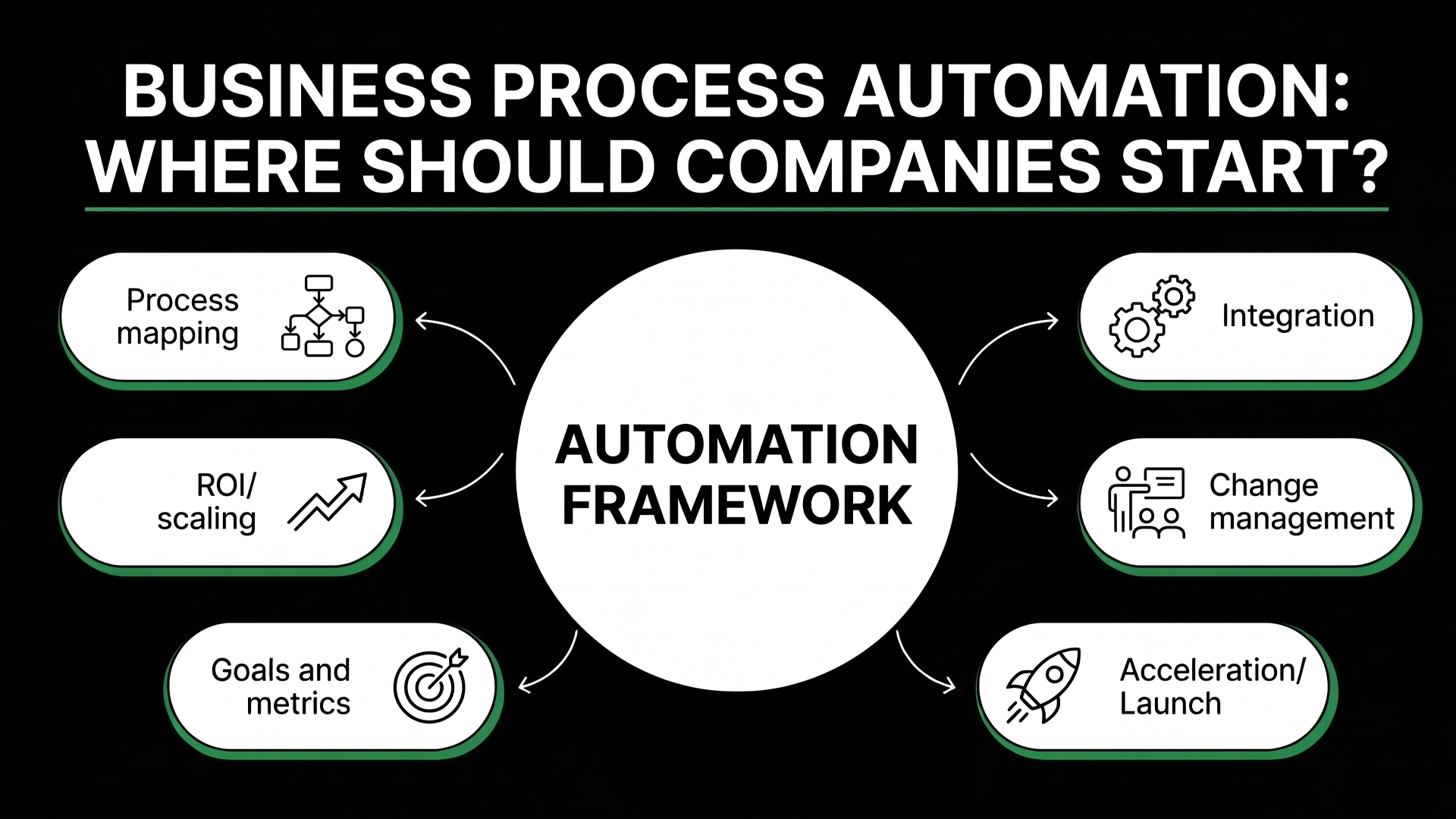
Automation is not a game only for the rich and technically savvy; every type of business, from a local shop to a global corporation, can benefit from it. Companies around the world are automating business tasks, saving time, increasing precision, accelerating approvals, and smoothing internal workflows.
Before buying a digital workflow solution or connecting cloud-based applications to a central orchestration tool, they rush ahead to construct workflows without mapping critical bottlenecks, ownership gaps, potential data integrity problems, and the underlying risks and failures in the original process. Automation, at this point, appears to be well-structured on paper but contributes little to efficiency in practice.
Automation, in reality, begins not with a new piece of technology. Automation begins with the process. The best place for companies to start automating their business processes is not the technology itself. Automation should start with identifying which of your own processes are repetitive, consume far too much time and energy, are riddled with errors and inefficiencies, and carry the potential to produce significant ROI if they were well-designed and executed. When you’ve done that work, automation ceases to be a pie-in-the-sky idea or another piece of digital hardware or software on the shelf, and instead becomes an actionable business-optimization project.
In this guide, you’ll find out exactly where you should begin, what process to put at the top of your priority list, what mistakes to absolutely avoid, and how to design a practical automation roadmap that will support your company for years to come.
What Is Business Process Automation?
Business Process Automation means utilizing the application of technology to carry out processes such as workflows, approvals, transfers of information, which call for the minimum participation of human intervention. In essence, rather than having staff continuously re-enter information, overlook errors, enter data right into spreadsheets, approve requests, and also duplicate information in between systems, automation can have these operations done immediately according to established guidelines. As an illustration of how this works, imagine that a person fills out a form on your web site.
An automated procedure can be set up to create a lead in your CRM, allocate it to a sales person, send the client a verification e-mail, alert the group that there is a new lead and also update a reporting dashboard.
If this wasn’t automated, then it might take numerous people to achieve all of those jobs, and there would certainly be a better chance for errors to take place or for the procedure to drag out. Automation is not about getting rid of individuals. Automation’s objective is to eliminate low-value repeated tasks so that your people can concentrate on decision making, offering your clients, strategizing, as well as driving business development. Automation must enhance the method individual’s work- not making people feel replaced.
Common areas where Business Process Automation is used include:
- Sales lead management
- Customer onboarding
- Invoice processing
- HR approvals
- Employee onboarding
- Customer support routing
- Inventory updates
- Data entry and reporting
- Internal notifications
- Task assignments
- Compliance tracking
A strong automation system connects people, platforms, and processes in a structured way. It helps the business move faster while keeping accountability clear.
Why Should Companies Start With Business Process Automation?
Relying on people to manually perform tasks becomes inefficient and expensive as your business grows. Managers spend their time sending emails just to check progress, employees spend a portion of each day performing the same actions repeatedly and if a problem occurs your system fails. All these seemingly insignificant details all add up over time.
Automating business processes, means you set up processes where operations are always executed and repeated in a predictable fashion and it doesn’t have to rely on human memory, informal systems, informal reminders and individual working practices.
Automation processes your business effectively with enhanced speed, reduces the chance of errors and you have a better overview of how business is progressing.
7 of the most common motivations for starting automation in companies. When companies start automating they most commonly have several driving factors:
- They desire to streamline repetitive administrative tasks
- They seek quicker customer response times
- They need a decrease in data entry, billing and/or reporting mistakes
- They seek a higher level of team and departmental visibility
- They desire continuity for business processes when teams are operating at high demand
- They need a system that can scale prior to hiring more people
- They require more organized compliance and approval processes
Where Should Companies Start With Business Process Automation?
Here’s how companies should begin their Business Process Automation journey: Look for one process that’s repetitive, measurable, and a source of customer or employee frustration. Your first automation shouldn’t be the biggest challenge you have as an organization; it should be a process that’s readily improvable, significant enough to be worth improving, and unambiguous in terms of measurement. Often, processes that lend themselves well to automation are those that occur regularly and conform to predictable sequences, like lead assignment, customer onboarding, approval workflows for invoices, or internal request handling.
Before choosing a process, companies should ask a few practical questions:
- Which task is repeated daily or weekly?
- Which process causes delays or confusion?
- Where do employees spend too much time copying, checking, or chasing information?
- Which workflow affects customers directly?
- Which process creates the most errors?
- Which task would save measurable time if automated?
- Which department is ready to adopt automation?
Usually it’s better to begin small than to attempt automating every part of the business. A first project for a business will demonstrate what’s functioning, assess how workers adopt it.
For many companies, the best starting point is one of these workflows:
- Lead capture and follow-up
- Customer onboarding
- Invoice approvals
- Internal task assignment
- Support ticket routing
- Employee onboarding
- Document approval
- Sales pipeline updates
- Basic reporting workflows
The goal of the first project is to create confidence. Once the business sees that automation can reduce friction and improve outcomes, it becomes easier to build a larger automation roadmap.
Which Business Processes Should Be Automated First?
Start by automating repetitive, rule-driven, and time-consuming tasks with clear business impacts. That’s not to say that every workflow needs to be automated- you’ll still need human judgment, relationship building, negotiating, creativity, and decision making. The best automation prospects are those workflows that can already be mapped out in a predictable sequence.
Take a new lead: For example, if every new lead has to be added to a CRM, assigned to a sales representative, tagged by source and followed up with an email, that process is ready for automation. It’s rule-driven, repetitive, and linked directly to revenue. Invoice approvals also tend to be ripe for automation because of the linear sequence of routing, reviewing, approving and paying.
A good rule of thumb is to tackle process improvement that impacts customer satisfaction, revenue, compliance and the productivity of your workforce.
High-priority processes usually include:
- Sales and CRM workflows
- Customer onboarding steps
- Finance approvals and invoice processing
- HR onboarding and employee documentation
- Customer support ticket handling
- Marketing lead nurturing
- Operations task assignment
- Reporting and dashboard updates
- Document review and approval
- Inventory or order status updates
As one strategy, one can assign a score to each of the workflows on metrics of how frequently it is done, the time it takes, the error frequency, the impact on the business, and how simple it is to automate. High business value, low-to-medium complexity projects typically provide a good starting point for automation. Processes that are murky, political, have a high rate of exceptions, or are heavily customized should not be first candidates. Automation is easier when the underlying process is already well-defined.
How Can Companies Identify Automation Opportunities?
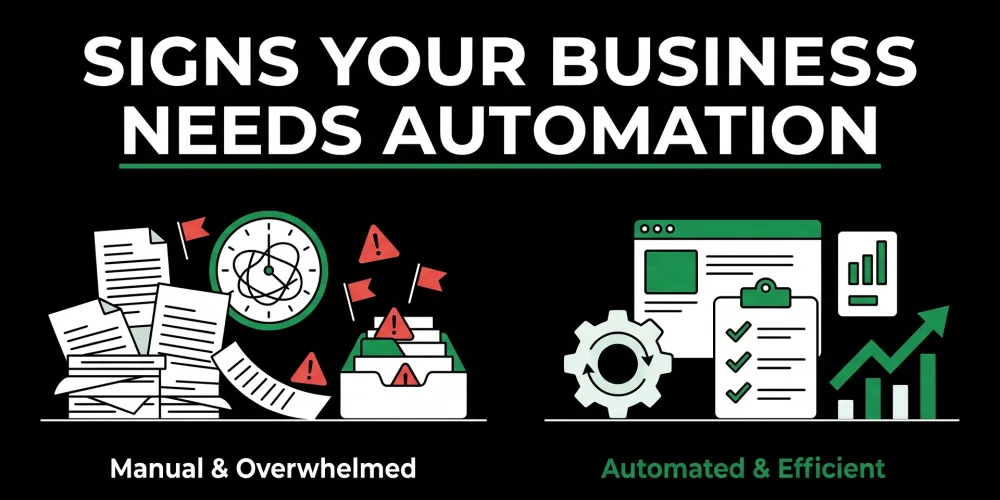
Companies can identify Business Process Automation opportunities by reviewing how work currently flows through teams, systems and departments. Your job is to locate those pain points where human labor is hindering operations and adding unnecessary risk. And those spots are often tucked away in plain sight. They’re the areas employees accept and tolerate on a day-to-day basis.
One good way to start identifying those areas is to map your processes. That is, outline the steps of a specific workflow in the business from end-to-end. For instance, if a business wants to optimize its customer onboarding process, it could map everything that happens once a new client enrolls, who gets notification of the enrollment, what systems get updated, what messages are sent, what approvals must be obtained, and where the slowdown typically happens.
Once the process is mapped, it’s easier to spot where automation may come into play. Redundant tasks done by hand, multiple entries of the same data, required but unnecessary sign-offs, ignored or absent notifications, and lack of clear ownership are almost always signals automation can benefit.
Companies should look for these automation signals:
- Employees copy data between systems manually.
- Managers chase people for updates.
- Customers wait for simple responses.
- Tasks are assigned through informal messages.
- Reports are built manually every week or month.
- Approvals are delayed because no one knows who owns the next step.
- Different teams use different versions of the same information.
- Errors happen because people retype the same data.
- Employees spend time on admin instead of meaningful work.
Talk to the people who are doing the work each day too. They generally know which tasks are the boring, tedious or just plain pain-in-the-neck ones. Where leaders are focusing on outcomes, the line of business folks have the pulse of the operational friction.
And those points where business pain and employee frustration intersect often represent the areas with the most attractive automation potential.
What Are the Main Benefits of Business Process Automation?
The top advantages of Business Process Automation – increased efficiency, fewer mistakes, reduced expenses, increased visibility, an enhanced customer journey and increased scalability; are also benefits that become critically important as a business expands and manual processes start becoming unmanageable.
In many cases, one of the very first benefits that your business may see as a result of Business Process Automation is saving time. Instead of manually entering data into the same fields over and over again, sending the same automated email reminder, updating the same old excel spreadsheet, and transferring information from one system to another, your team is freed up to focus on what’s most important: tasks that require judgment and skill.
And speaking of freeing up your team, another huge advantage of automation is increased consistency. While human tasks may be subject to individual process interpretations- a person may be less careful when they are having a busy day, and you may have a handful of different interpretations; of the same procedure spread across the organization. Business Process Automation takes that away. Automated processes operate consistently, without variation, every time.
You may even find that Business Process Automation will actually improve decision-making within your company. When tasks are automated, they become better at recording consistent and reliable data. That data can then be used to give managers more transparency and insight into what is – or isn’t – working within their teams and make more effective decisions based on real time data instead of just educated guesswork.
Key benefits include:
- Faster task completion
- Reduced manual errors
- Better customer response times
- Improved employee productivity
- Lower operational waste
- Clearer accountability
- Better process visibility
- Easier reporting
- Stronger compliance tracking
- More scalable operations
Scalability is perhaps one of the key benefits for a rapidly expanding business. When businesses automate their work, they can deal with a greater workload without hiring additional employees instantly. Automation does not mean employees have become irrelevant but they are able to focus on high-value tasks while the low-value repeatable processes are outsourced to dependable automated systems.
At Helionex, we also help businesses improve operational efficiency through our Business Process Outsourcing services, where repetitive and time-consuming business functions can be managed more effectively. This allows companies to reduce administrative workload, improve process consistency, and focus their internal teams on strategic growth activities
What Mistakes Should Companies Avoid When Starting Automation?
And to round it out, remember: do not embark on Business Process Automation before you understand the process you wish to optimize. Automating a broken process does not fix it – in most situations, it simply breaks the process faster, exposes the process’s defects, and makes the process harder to manage. If your current workflow is complex, ill-defined, lacks clear ownership or is replete with exceptions, you might wind up with more problems than you solve.
It is important to note, for instance, that the mistake most people make when implementing automation is choosing a solution before defining a workflow. Rather than asking, “What is the best automation software for us to invest in?” these organizations should be asking, “What business process are we attempting to improve?” Your business process, not the technology that automates it, should determine which software is right for your needs.
Another common misstep, of course, is to attempt too much automation at once. These types of all-or-nothing projects often collapse due to a lack of organizational alignment across departments, too many intertwined systems and, to no surprise, the lack of clarity concerning requirements. Beginning with a single workflow allows the business to quickly test its hypotheses while laying a foundation for additional automation efforts.
Companies should avoid these mistakes:
- Automating unclear or broken processes
- Choosing software before mapping workflows
- Ignoring employee feedback
- Trying to automate everything at once
- Failing to define success metrics
- Overcomplicating simple workflows
- Not assigning process ownership
- Ignoring data quality issues
- Forgetting about security and permissions
- Treating automation as a one-time project
Another serious mistake is failing to plan for maintenance. Business processes change over time. Teams grow, tools change, customer expectations shift, and approval rules evolve. Automation should be reviewed regularly to make sure it still supports the business.
Successful automation requires strategy, not just software.
How Should Companies Build a Business Process Automation Roadmap?
First, we suggest creating a Business Process Automation roadmap to identify opportunities, rank them by value and complexity, and take a phased implementation approach. Automation shouldn’t happen haphazardly, and a roadmap ensures the company aligns automation to strategic objectives. We recommend starting with the discovery phase to identify current workflows, process owners, business challenges, existing technologies, and to define business outcomes. After the discovery, each automation opportunity is then ranked according to the following criteria: impact, effort, risk and readiness.
We envision a very simple roadmap can have three phases. Phase one of the roadmap would consist of low-hanging fruits to achieve quick wins. Quick wins include but are not limited to routing leads to salespeople, automatic notifications, automatic task assignment or basic approvals. Phase two would consist of department-specific automation which include processes such as CRM automations, financial process approvals, HR onboarding, or customer service operations. The third phase would typically involve integrating different systems to allow for advanced reporting and integrations as well as optimizations.
A practical automation roadmap should include:
- Current process analysis
- Process priority scoring
- Automation goals
- Required tools and integrations
- Data flow requirements
- Workflow ownership
- Implementation timeline
- Testing plan
- Employee training
- Performance measurement
- Maintenance schedule
And finally, you need to identify how to measure success on that roadmap. Whether it’s shaving 40% off your invoice approval time, speeding up your lead response time, saving time from manual reporting, or lowering customer onboarding time, you need to have goals in mind. A roadmap will help you stay on track and turn your Business Process Automation from a random effort into an actual growth strategy.
What Tools Are Used for Business Process Automation?
You can get Business Process Automation with anything from a workflow automation tool, CRM software, ERPs, and project management tools, to customer service platforms, integration solutions, and even low-code and custom software. The best solution is all about your company’s process complexity, your existing systems, budget, and future objectives.
Some simple processes can even be automated by features that are already present in a tool you’re currently using. Most CRMs, email marketing software, project management, and support tools are already offering automation functionalities for sending status updates, notifications, creating tasks, and follow-up routines.
For processes with a higher level of complexity, you might need an integration tool that helps different software solutions communicate with each other, moving information between them automatically. Let’s say your business receives form entries: those entries might automatically create a task, update the CRM, notify a team, and start sending follow-up emails.
When a business has unique or advanced needs – think customized processes, rigorous compliance requirements, complex approvals, or industry-specific operations – custom automation is your best bet. It’s developed in-house or commissioned to serve specific business requirements that off-the-shelf solutions simply can’t meet.
Common tool categories include:
- CRM automation tools
- Workflow automation platforms
- ERP systems
- Robotic process automation tools
- Integration platforms
- Low-code and no-code builders
- Project management automation tools
- Customer support automation systems
- Custom web applications
- Reporting and dashboard tools
Companies should not choose tools based only on popularity. The best tool is the one that fits the process, integrates with existing systems, supports security requirements, and can scale with the business.
How Much Does Business Process Automation Cost?
Business Process Automation cost depends on process complexity, number of systems involved, workflow volume, customization needs, integrations, user roles, reporting requirements, and long-term support. A simple automation may be inexpensive if it uses existing tools and requires only basic configuration. A complex automation system may require custom development, advanced integrations, data migration, security planning, and ongoing maintenance.
Cost should not be evaluated only by setup price. Companies should also consider the cost of manual work, errors, delays, customer dissatisfaction, missed opportunities, and future scalability problems. In many cases, manual processes appear cheaper because the cost is hidden inside employee time and operational inefficiency.
Key cost drivers include:
- Number of workflows being automated
- Complexity of business rules
- Number of software integrations
- Data migration requirements
- User permissions and access control
- Reporting and analytics needs
- Custom interface requirements
- Compliance and security requirements
- Training and documentation
- Ongoing maintenance
Maybe your workflow automation project is a small-department, few-tools affair. Maybe it’s cross-department, with a custom dashboard, API integrations, approvals logic, and role-based access.
Maybe the better question to ask isn’t, “How much will this cost in automation investment?” but “How much is this costing me in wasted hours, lost leads, delayed approvals, and manual mistakes?” It’s when you weigh your automation cost against your manual cost that you might start seeing the light.
How Long Does Business Process Automation Take to Implement?
How long do BPA projects take? This depends on many factors like how large your workflow is, the clarity of requirements, how many systems you need to integrate, the quality of your data, and how much involvement you need from stakeholders and testers. It can take a matter of weeks or months to design and roll out a solution. Larger projects, often cross-functional, may even need a staged approach.
It generally takes much less time to automate small and discrete processes that involve fewer decision-makers and systems. The time to automate lead notification or the creation of an internal task, for example, might be short if you already have a clearly documented process in place. More complex processes, such as financing approvals, customer onboarding, or multi-system reporting, on the other hand, will require a longer time frame and more consideration of dependencies, rules, and permissions.
A typical implementation process includes:
- Process discovery
- Workflow mapping
- Tool and integration review
- Automation design
- Development or configuration
- Testing
- Team training
- Launch
- Monitoring and improvement
Don’t throw automation at processes without testing. It might seem like the workflow is perfect on paper but once you factor in real users, live data, and edge cases – everything can and often does go haywire. Testing reveals broken handoffs, missing conditions, duplicate alerts, and access problems before the automation makes its way into everyone’s daily workflow.
Pilot the automation, evaluate the results, gather feedback, make it better, then slowly introduce it to the organization.
How Can Business Process Automation Improve Customer Experience?
Business Process Automation can make your customers’ experiences so much better because there will be fewer delays, fewer dropped balls and follow-ups missed, less wait time, and more uniform service delivery. The reality of it is customers don’t generally care if you use automation “in the background.” They care if you get them a prompt response, accurate information, a seamless onboarding process and consistent communication.
For example, when a customer requests something, automation can trigger an immediate acknowledgment, the creation of a support ticket, assignment to the appropriate team, the establishment of the right level of priority, and reminders to ensure the task is completed within the timeframe. Nothing sits overlooked in an inbox this way.
And automation can help you provide more personal communication on a large scale. A business can automate updates for customers as they act, on their order’s progress, on the service status, on the status of their onboarding, or on something else entirely. This ensures your customers stay informed without the entire team sending out a message to each customer manually.
Customer experience improves when automation supports:
- Faster inquiry responses
- Clear onboarding steps
- Automatic status updates
- Fewer repeated questions
- Better support ticket routing
- Timely reminders
- Consistent service quality
- Reduced human error
- Better handoffs between teams
But even then, automation has to be deployed in such a way that customers aren’t feeling like they’re stuck talking to a robot. After all, tricky questions, complaints, valuable clients, and personal information will likely still need a human touch. The most successful automation will enhance the customer journey, while freeing up human employees to have real conversations
How Does Business Process Automation Support Business Growth?
Growth often brings the flaws of your manual processes into the spotlight, far sooner than it highlights the positives. As your company grows, you start dealing with a surge of sales orders, clients, team members, and information, all funneling through the very same systems you developed for a significantly smaller operation.
That’s where automation truly shines – moving from a simple cost-saving tool to a powerful engine for growth. It introduces order and consistency into your workflows, enabling you to scale your business strategically rather than having to resort to hiring for every single surge in demand. In action, this translates to quicker lead distribution, a smoother customer onboarding process, approval workflows that no longer require incessant follow-up, and much clearer performance metrics for your managers.
With automation, business growth is smoother and more manageable when the following are improved:
- Sales pipeline efficiency
- Onboarding capabilities for new customers
- Approval procedures within the organization
- Reporting accuracy and consistency
- Team member accountability
- Efficiency of service delivery
- Operational consistency
- Collaboration between departments
- Planning of resources
- Monitoring of performance
Additionally, automation provides leaders with better visibility into the real-time operations of their business. Through optimized workflows and the collection of consistent data, organizations can more effectively pinpoint what’s functioning well, where bottlenecks are creating delays, and which processes can benefit most from optimization.
With Business Process Automation, you move past a basic efficiency improvement; you’re building the groundwork for sustainable, long-term scalability.
As businesses grow, maintaining the right operational capacity becomes equally important. Helionex supports organizations through Workforce Scaling Management services, helping companies build flexible teams, manage changing workloads, and maintain productivity as business demands increase.
When Is a Company Ready for Business Process Automation?
Think it’s time for Business Process Automation? Signs include work moving slowly, the number of manual mistakes increasing, customers experiencing long and irregular response times, and a general lack of clarity for managers on day-to-day operations. You don’t have to be a big business to get started; in fact, small to medium-sized businesses often see the greatest returns on investment once they’ve established repeatable processes and have growth targets.
If you feel pressure to move more quickly than your team is able to deliver, despite everyone working diligently, then it’s possible you need to automate to eliminate wasted time and manual processes. And if you’re seeing discrepancies in how individual tasks are completed or customers are handled, automation can ensure processes are uniform and essential steps aren’t forgotten.
A company may be ready for automation if:
- Employees repeat the same tasks every day.
- Customer inquiries are missed or delayed.
- Managers spend too much time chasing updates.
- Data is stored across disconnected tools.
- Reports take too long to prepare manually.
- Errors happen during data entry or approvals.
- Growth is creating pressure on existing teams.
- Customers expect faster communication.
- The company wants to scale without adding unnecessary admin work.
The best time to start is before processes become completely unmanageable. Automation works best when it is used proactively, not only after operational problems become urgent.
How Should Companies Measure Business Process Automation Success?
To gauge Business Process Automation success, businesses should look to: time savings, error reduction, faster workflow processes, higher employee productivity, shorter customer response times, reduced operational costs and improved business results. Otherwise, you won’t know if you’ve just added another technology layer or automation that’s working in practice.
Determine your current performance metrics prior to implementing automation. For instance, what’s the current process time, the number of errors that are made each month, the amount of time spent on manual labor by your employees, or the time that your customers have to wait? Baseline these metrics to establish a point of comparison.
Useful automation metrics include:
- Average process completion time
- Number of manual steps removed
- Error rate before and after automation
- Employee hours saved
- Customer response time
- Approval turnaround time
- Lead follow-up speed
- Support resolution time
- Cost per process
- User adoption rate
- Workflow failure rate
Beyond the quantifiable, it is important for companies to measure qualitative results. Perhaps employees will become less frustrated, customers will be better informed, or managers will be provided better insight into processes. Those outcomes can be extremely important, even if not always measurable financially.
Why Choose Helionex for Business Process Automation?
Companies turn to Helionex to automate business processes in a planned, organized and scalable way. We don’t come in with solutions on day one. Instead, Helionex strives to understand the way you do business today: where the bottlenecks are, what needs to be connected and what processes will generate the greatest return upon automation.
We’ve found that many automation initiatives fail due to a narrow, “software implementation” approach. We at Helionex do things a bit differently. Our aim isn’t simply to build automated tasks; our mission is to engineer workflow processes that bring order to complexity, minimize manual intervention and are prepared to grow along with your business.
Helionex can support your automation journey by helping with:
- Business process discovery
- Workflow mapping
- Automation opportunity analysis
- Tool and platform selection
- CRM and system integration
- Custom workflow automation
- Data flow planning
- Reporting and dashboard setup
- Employee adoption support
- Ongoing optimization
The biggest advantage of choosing Helionex as your automation partner? They operate based on real business results. The Helionex team thinks about automation not only from a technical standpoint but also in an operational sense; your automation solution will not only work but also be well-integrated with your team’s processes.
What Is the Best Way to Start Business Process Automation?
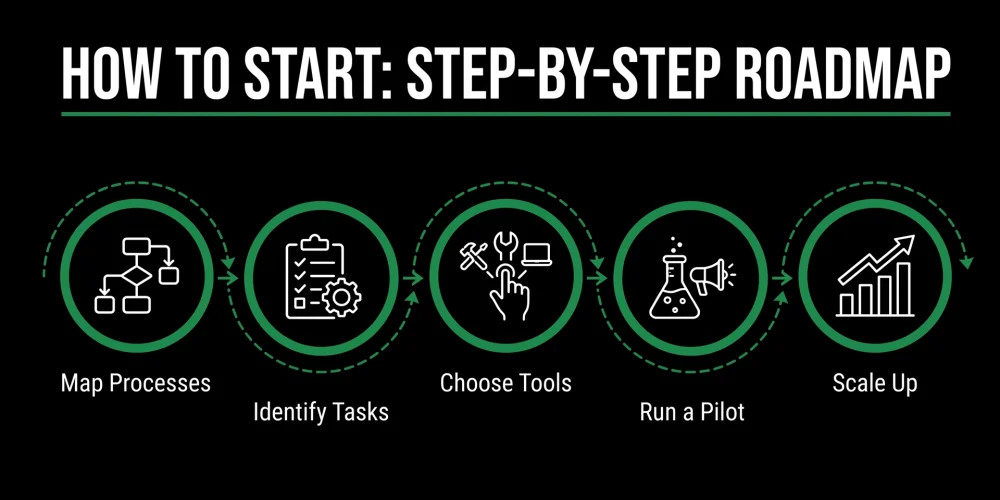
A smart way to approach Business Process Automation: Focus on one key workflow, get it mapped out, know how to define success, pick your tech and get it going in stages. You don’t have to automate everything all at once – in reality, some of the best automation efforts often begin with one small, manageable step forward. Start by targeting your biggest pain point.
From there, draw out how the process works right now, from each individual, tool, and decision point to each data field, approval and bottleneck.
Then, as you’ve fully mapped out the current state, determine which activities should be automated, which will stay human, and which should be tossed altogether.
A simple starting framework looks like this:
- Identify one high-impact process.
- Map the current workflow.
- Find repetitive and manual steps.
- Define the desired outcome.
- Select the right automation approach.
- Test the workflow with real scenarios.
- Train the team.
- Measure performance.
- Improve before expanding.
This approach reduces risk and creates early momentum. It also helps employees understand that automation is not being forced onto the business. It is being introduced to remove friction and make work easier. Business Process Automation works best when it is practical, measured, and connected to real business goals.
Conclusion:
Business Process Automation Starts With Clarity, Not Complexity. If you want your company to evolve, you need a proper roadmap to implement Business Process Automation. It’s not about automating everything, nor is it about getting hold of all possible high-end software.
BPA is all about spotting where humans make mistakes and designing intelligent processes that give better output speed and accuracy. How would companies automate BPA?First, identify one repetitive, valuable, and well-understood business process.
Then document that process and look for an opportunity to cut out any unnecessary steps and implement the tools that could do it all. Once you get your initial automation project to work and succeed, you could take on the more complex processes across various departments with your employees’ help and your experience.
To make your business thrive without any added operational stress, Business Process Automation would be one of the most logical investments you could make. You would enhance team output, improve customer service, and boost operational awareness.
So if you’re looking for the right plan and execution, as well as automated processes and smart workflows, you can depend on Helionex to take you to the next level of automation.
FAQs about Business Process Automation
What is the first step in Business Process Automation?
You should choose one time-consuming, repetitive task that creates delays or errors. Plan out all the steps involved and what can be fixed before you select any tools.
Which business processes are best for automation?
When considering business process automation, look for repeatable and rule-driven activities, like the following:
- Assigning leads.
- Approving invoices.
- Customer onboarding.
- Keeping reports current.
- Routing support tickets.
How does Business Process Automation help small businesses?
Automating your business processes will save you precious hours, minimize errors due to human involvement, speed up responses to customers and allow you to scale your business without administrative headaches.
When should a company invest in Business Process Automation?
Investing makes sense when repetitive and time-consuming processes start to bottleneck your teams – leading to dropped leads, costly mistakes, or a struggle to meet growing demand